

Build your first RAG assistant with LangChain
Table of Contents
A language model only knows what it saw during training. It knows nothing about your internal reports, your datasets or your project documentation — and when asked about them, it may confidently make something up.
Retrieval-Augmented Generation (RAG) fills that gap. Before answering, the assistant looks up the relevant passages in your own documents, then uses them as context to build its answer. This post walks through the four building blocks of a RAG pipeline and a first implementation in Python.
Why RAG?
Retraining a model on your data is expensive and quickly goes stale. With RAG, your documents stay separate from the model: update them and the assistant takes the changes into account on the next question. Another benefit is traceability — every answer can point to the passages it was built from, which makes it verifiable.
Key takeaway
RAG doesn't make the model smarter: it gives it the right context at the right time. Answer quality depends first on the quality of your documents and how you split them.
The four steps of a RAG pipeline
Whatever the framework, a RAG system has two phases. Indexing happens once, when documents are added. Querying happens for every question.
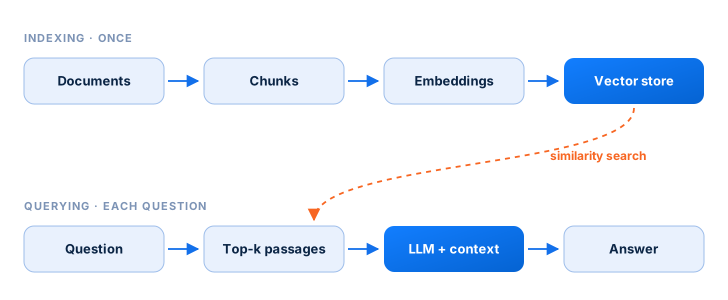 Fig. 1. A RAG pipeline. Documents are indexed once; each question retrieves the closest passages before generation.
- Load — read the source documents (PDFs, web pages, text files).
- Split — cut them into short passages that overlap slightly so no context is lost at the boundaries.
- Index — turn each passage into a vector (an embedding) and store it in a vector database.
- Query — for each question, retrieve the closest passages and pass them to the model along with the question.
Choosing the chunk size
Passages that are too long dilute the relevant information; passages that are too short lose their context. A common starting point is a chunk_size of a few hundred to a thousand characters, with a chunk_overlap of 10 to 20% — then adjust by testing on real questions.
Measuring similarity
To find the passages closest to a question, both are turned into vectors and compared. The most common measure is cosine similarity: it looks at the angle between the two vectors rather than their length.
Cosine similarity between the question vector q and a passage vector d.
A first pipeline in Python
Here is the skeleton of the four steps with LangChain. The embedding model is up to you: a local open-source model or an API.
from langchain_community.document_loaders import PyPDFLoader
from langchain_text_splitters import RecursiveCharacterTextSplitter
from langchain_community.vectorstores import FAISS

# 1. Load
docs = PyPDFLoader("nutrition_guide.pdf").load()

# 2. Split
splitter = RecursiveCharacterTextSplitter(chunk_size=800, chunk_overlap=100)
chunks = splitter.split_documents(docs)

# 3. Index
embeddings = ...  # the embedding model of your choice
vectorstore = FAISS.from_documents(chunks, embeddings)

# 4. Query
retriever = vectorstore.as_retriever(search_kwargs=dict(k=4))
passages = retriever.invoke("Which local foods are rich in iron?")
The retriever returns the four most relevant passages for the question. All that's left is to insert them into the prompt sent to the language model, with the instruction to answer only from that context — and to say so when the answer isn't there.
Going further
Once this foundation is in place, the real gains usually come from three places:
- Evaluating answers on a set of test questions, so each change can be measured.
- Trying different embedding models, especially for French and local languages.
- Combining vector search with keyword search for names, codes and acronyms.
References
- Lewis, P., Perez, E., Piktus, A., et al. (2020). Retrieval-Augmented Generation for Knowledge-Intensive NLP Tasks. NeurIPS 2020. arXiv:2005.11401
- Johnson, J., Douze, M., & Jégou, H. (2017). Billion-scale similarity search with GPUs. arXiv:1702.08734
- LangChain documentation. python.langchain.com
Citation
Cited as:
DAH Labs Team. (September 2026). Build your first RAG assistant with LangChain. DAH Labs Blog. https://dah-projects-and-innovations.github.io/dah-labs-site/en/blog/rag-langchain/
Or
@article{dahlabs2026raglangchain,
  title   = "Build your first RAG assistant with LangChain",
  author  = "DAH Labs Team",
  journal = "DAH Labs Blog",
  year    = "2026",
  url     = "https://dah-projects-and-innovations.github.io/dah-labs-site/en/blog/rag-langchain/"
}
Articles written by members of DAH Labs, the innovation and incubation center of Data Afrique Hub.